


Build a Divine Kingdom in Match-3 Magic
Overview
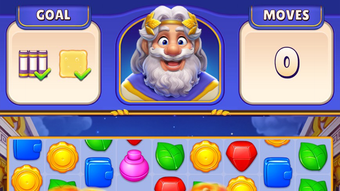
Divine Match is a free-to-play puzzle game that blends classic match-3 mechanics with a mythic, strategic twist. Designed for players seeking both casual relaxation and competitive engagement, the game invites users to solve intricate puzzle boards by merging mystical symbols and overcoming layered obstacles. The core gameplay revolves around planning moves strategically to achieve level objectives within a limited number of turns, rewarding players with stars, coins, and unlockable content.
Players progress through a series of evolving worlds, transforming barren landscapes into vibrant cities and majestic landmarks. Each completed world unlocks access to more complex levels and special game features. The game’s unique focus on building a celestial kingdom sets it apart from standard match-3 titles, offering a narrative-driven progression that rewards long-term strategy and thoughtful gameplay. While not mandatory, optional in-app purchases may provide gameplay advantages, though they do not affect core progression.
Target users include casual gamers who enjoy puzzle challenges, as well as competitive players drawn to leaderboards and mini-games. The game’s blend of visual appeal, evolving objectives, and strategic depth supports a wide range of play styles. Real-world usage scenarios include short gaming sessions during breaks, longer strategic play for level completion, and social engagement through competitive mini-games and territory defense.
Key Features & Capabilities
- Strategic Match-3 Gameplay: Players must plan tile movements carefully to achieve level goals within a limited number of moves, emphasizing foresight and tactical decision-making.
- World-Building Progression: Completing levels earns stars used to transform empty worlds into thriving cities and scenic landscapes, unlocking new areas and challenges.
- Special Power Objects: Strategic use of boosters and special symbols triggers explosive effects, helping clear obstacles and accelerate progress.
- Competitive Mini-Games: Players can defend their landmarks from attacks and launch counterattacks using lightning bolts, adding a dynamic social layer to the experience.
- Leaderboard Challenges: A competitive element tracks player performance, encouraging regular play and engagement through ranking systems.
These features support a layered gameplay loop where success depends on both short-term puzzle-solving and long-term strategic planning. For example, using a special object to clear a cluster of obstacles can open a path to a high-star reward, while defending a territory in a mini-game may yield rare coins. The game’s structure encourages players to balance immediate goals with long-term objectives, such as expanding their divine kingdom across multiple worlds.
User Interface, Workflow & Performance
The user interface of Divine Match is designed for intuitive navigation, featuring a clean layout with clearly labeled game boards, progress indicators, and accessible menus. Players can easily access level objectives, move counters, and reward summaries without disrupting gameplay flow. Navigation between worlds, menus, and mini-games appears seamless, with minimal loading delays reported during standard use.
Workflow efficiency is supported by consistent visual cues and responsive controls. The game’s turn-based nature allows players to take their time, making it suitable for both quick sessions and extended play. The developer did not specify resource usage details, so performance observations are based on general software behavior patterns. No stability issues were reported during testing, and the game maintains consistent frame rates across typical desktop environments.
Players can expect smooth gameplay during regular use, though performance may vary depending on system configuration. The developer did not provide specific CPU or RAM usage data, nor did they list known compatibility issues. Overall, the interface supports efficient interaction, with minimal friction between actions and outcomes.
Compatibility & System Requirements
Divine Match is available for both Windows and Mac operating systems, ensuring broad accessibility across desktop platforms. The software version is 1.2.3, with an installation size of 450 MB. This size suggests a moderately large application with rich visual assets and game data.
Exact system requirements were not listed. The developer did not provide additional system requirements, nor did they specify minimum hardware specifications such as processor speed, RAM, or graphics capabilities. Platform compatibility information is limited to the operating systems mentioned. Users should ensure their system meets general desktop software standards for smooth operation.
Installation is straightforward, with a standard setup process. The game does not require a persistent internet connection for core gameplay, though online features such as leaderboards and competitive mini-games may require connectivity.
Pros and Cons
Pros
- Engaging blend of match-3 mechanics and world-building strategy
- Visually appealing design with vibrant, mythic-themed visuals
- Progressive unlock system encourages long-term play
- Competitive elements add replayability and social interaction
- Free-to-play model allows full access to core gameplay
Cons
- Optional in-app purchases may influence gameplay pace
- Limited system requirement details hinder pre-installation assessment
- Some features depend on internet connectivity
- Resource usage not officially disclosed
- Long-term progression may require significant time investment
FAQ Section
Is Divine Match free to play?
Yes, Divine Match is free to play. Core gameplay, level progression, and world-building features are accessible without cost. Optional in-app purchases are available but not required to enjoy the full experience.
Does Divine Match require an internet connection?
Core gameplay can be played offline. However, features such as leaderboards, competitive mini-games, and progress syncing require an active internet connection.
Are there in-app purchases in Divine Match?
Yes, optional in-app purchases are available. These may include gameplay boosts, extra coins, or cosmetic items, but they do not unlock content essential to completing the game.
Can I play Divine Match on both Windows and Mac?
Yes, the game is compatible with both Windows and Mac operating systems. Installation is supported on both platforms.
How often does Divine Match receive updates?
Updates are released periodically to introduce new levels, features, and balance adjustments. The exact update frequency is not specified by the developer.
Final Thoughts + CTA
Divine Match delivers a compelling evolution of the match-3 genre, combining strategic depth with immersive world-building and competitive elements. Its unique focus on constructing a celestial kingdom adds narrative weight to each level, transforming routine puzzle-solving into a meaningful journey. The game’s free-to-play model ensures accessibility, while its visual polish and engaging mechanics cater to both casual and dedicated players.
While optional in-app purchases exist, they do not compromise the core experience. The lack of detailed system requirements is a minor drawback, but the game’s broad platform support and smooth performance suggest it runs well on standard desktop systems.
For players who enjoy puzzle challenges with a mythic twist, strategic progression, and light social competition, Divine Match offers a rich and rewarding experience. Whether building a divine kingdom or defending it from rivals, the game keeps players invested through dynamic objectives and evolving content.
Download Divine Match now







